• support@macstocktech.com
  • +91 9709487145
  • Message us today! +91 9709487145

Logo
  • Home
  • Services
  • Expertise
  • Team
  • Blogs
  • Contact

How to remove chrome is being controlled by automated test software in Selenium Python

  • Home
  • Blog Details
  • May 8 2021
  • Macstock Tech

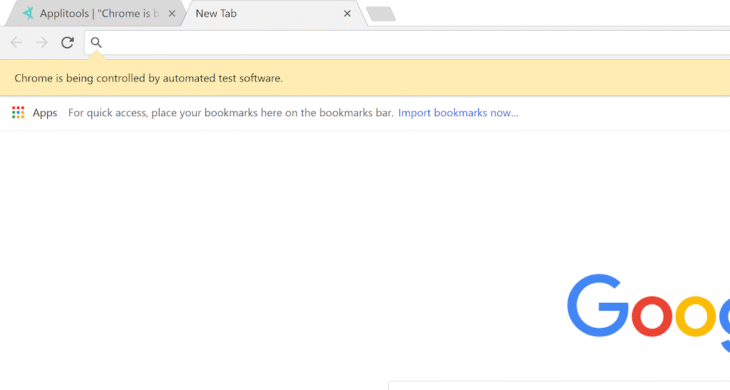
Hii Everyone, In this Post I am going to explain You How to Remove the Info Message “Chrome is being Controlled by automated test software” in Python Selenium. So, read till the end and don’t forget to share the post with your friends. So, let’s get started.

What is this Message?

This messages shows that the window which is running is a selenium driven chrome window not a normal user window. It is enabled by Default, so that user can see it is selenium driven window. But there is a way to disable this Info Message and I am going to explain the way.

How to Disable it?

This info message is so easy to disable, you just have to add a little amount of code to disable the info message. Let’s look what is the code.

from selenium import webdriver # Importing webdriver from the selenium package

options = webdriver.ChromeOptions() # Initializing Chrome Options from the Webdriver
options.add_experimental_option("useAutomationExtension", False) # Adding Argument to Not Use Automation Extension
options.add_experimental_option("excludeSwitches",["enable-automation"]) # Excluding enable-automation Switch

driver = webdriver.Chrome(options=options) # Initialzing Chromedriver and giving argument options which is initialized and modified before

Here is the full Commented Code to Disable The Infobars. Hope this post helped you in disabling the info message. Thanks For Reading 🙂

Previous Post
How to open a link in new Tab in Selenium Python | Open Any Link in New Tab and Switch Between Tabs Using Selenium
Next Post
How to make a Captcha Solver in Python without using Machine Learning

Leave a Comment Cancel reply

Recent Posts

  • How to Use Laptop Display and External Monitor as Dual Monitor
  • Create a Dynamic Website with Flask without using any Database
  • Choosing the Best Laptop for Coding
  • How to make a Captcha Solver in Python without using Machine Learning
  • How to remove chrome is being controlled by automated test software in Selenium Python

Categories

  • Guide 3
  • Problem Solving 3
  • Projects 2
  • Python 4
  • Tech 4
  • Tutorials 4

Recent Comments

  • avenue17 on Create a Dynamic Website with Flask without using any Database

Tags

connectlaptop desktop flask flaskapp flaskdevelopment laptop monitor monitorsetup python pythonproject webdev
Shape
Logo

Macstock Tech offers IT and digital solutions through web development, e-commerce, marketing, and social media services to help businesses grow online.

Quick Links

  • Home
  • Services
  • Expertise
  • Team
  • Contact Us
  • Our Blogs

Contact Info

  • support@macstocktech.com
  • +91 9798149880
    +91 9709487145

© Copyright 2025 Macstocktech.com | All Rights Reserved

  • Contact